
Databound Schedule controls for Project Management
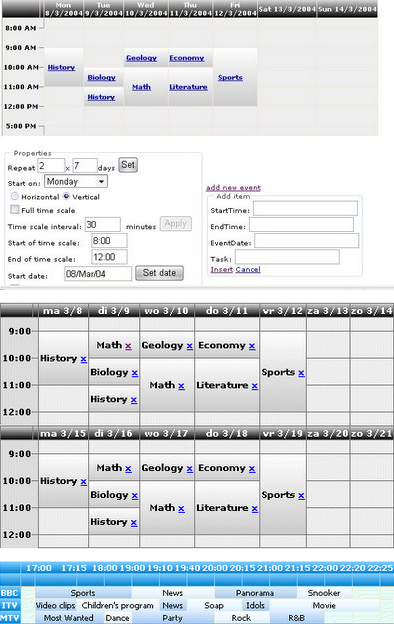
These are two free controls, ScheduleCalendar and ScheduleGeneral, designed to show scheduled events in the form of a table. They are simple versions of the so-called Gantt chart. They don't have advanced features such as dependencies and milestones, but on the other hand, they use templated databinding, so it's up to you, the developer, what you want to show.
The controls can be used for a broad variety of applications: time tables, resource usage planners, calendars, event schedulers, activities, reservations, sequences, project management, etc... See the demos for some examples.

Firstly Install ansmptp.exe :
Source Code:
using AOSMTPLib;
AOSMTPLib.MailClass oSmtp = new AOSMTPLib.MailClass();
oSmtp.FromAddr = "chinnamallempati9@gmail.com";
oSmtp.AddRecipient("Support Team", "anveshmallempati9@gmail.com", 0);
oSmtp.Subject = "Test";
oSmtp.BodyText = "Hello, this is a test....";
if (oSmtp.SendMail() == 0)
{
Response.Write("Message delivered!");
}
else
{
Response.Write(oSmtp.GetLastErrDescription());
}
String militaryTimeFormat = "HH:mm";
String input = DateTime.Now.ToString(militaryTimeFormat);
DateTime time = DateTime.ParseExact(input, militaryTimeFormat, null);
string militaryTime = "06/07/2013 20:30";
IFormatProvider culture = new System.Globalization.CultureInfo("en-US", true);
DateTime militaryDate =DateTime.Parse(militaryTime, culture, System.Globalization.DateTimeStyles.NoCurrentDateDefault);
string g=DateTime.Now.ToString("dd/MM/yyyy HH:mm");
string h = DateTime.Now.ToString("HH:mm");
{
int count =Convert.ToInt32(TextBox1.Text);
Panel1.Controls.Clear();
Table tb = new Table();
tb.GridLines = GridLines.Both;
for (int i = 0; i < count; i++)
{
TableCell c1 = new TableCell();
TableRow rw = new TableRow();
TextBox tx = new TextBox();
c1.Controls.Add(tx);
rw.Cells.Add(c1);
tb.Rows.Add(rw);
}
Panel1.Controls.Add(tb);
}

Server Side Coding: c#
SqlConnection scn = new SqlConnection("Data Source=.;Initial Catalog=iptv_database;Integrated Security=True");
int Start;
protected void Page_Load(object sender, EventArgs e)
{
if (!Page.IsPostBack)
{
ViewState["Start"] = 0;
BindData();
}
}
void BindData()
{
SqlDataAdapter da = new SqlDataAdapter("select * from addprogram", scn);
DataSet ds= new DataSet();
Start = (int)ViewState["Start"];
ViewState["Size"] = 2;
da.Fill(ds,Start,(int)ViewState["Size"], "addprogram");
DataList1.DataSource = ds;
DataList1.DataBind();
}
protected void lnkPrevious_Click(object sender, EventArgs e)
{
Start = (int)ViewState["Start"] - (int)ViewState["Size"];
ViewState["Start"] = Start;
if (Start <= 0)
{
ViewState["Start"] = 0;
}
BindData();
}
protected void lnkNext_Click(object sender, EventArgs e)
{
int count = DataList1.Items.Count;
Start = (int)ViewState["Start"] + (int)ViewState["Size"];
ViewState["Start"] = Start;
if (count <(int)ViewState["Size"])
{
ViewState["Start"] = (int)ViewState["Start"] + (int)ViewState["Size"];
Start = (int)ViewState["Start"];}
}


